
- Barcoding
- Printing
- Mobile Computing
- RFID
- POS Equipment
- Wireless
- Brands
- 1-800-485-3730
Navigation
What's in a barcode?
Barcodes allow you to easily and accurately track items and reference data associated with those items. While it’s easy to feel intimidated by barcodes, the technology is simple. A common, one-dimensional barcode simply represents a string of numbers and/or letters. Similar to your car’s license plate, a barcode is a reference number that is not descriptive by itself but can be used to look up detailed information. This information is stored in some type of database (a library system or even an Excel spreadsheet). Once you scan the barcode, you can then pull up the descriptive data you have assigned to the barcode in the database.
For example, a barcode on a library book does not contain a description of the book or the story it holds; instead the barcode has a "product number" (14 digits) in it. When read by a barcode reader and transmitted to the computer, the computer finds the disk file item record(s) associated with that item number. In the disk file is the book name, inventory level, book location, etc. When scanned at check-out, the computer subtracts the book from the inventory.
Barcode Structure
Barcode is a series of varying width vertical lines (called bars) and spaces. Bars and spaces together are named "elements". There are different combinations of the bars and spaces which represent different characters.

When a barcode scanner is passed over the barcode, the light source from the scanner is absorbed by the dark bars and not reflected, but it is reflected by the light spaces. A photocell detector in the scanner receives the reflected light and converts the light into an electrical signal.
A Laser Barcode Scanner uses a rapidly-moving laser to shine a particular frequency of light at the black and white bars of a barcode. The laser light is reflected off the barcode and read by a photo diode in the barcode scanner. The barcode scanner then interprets the reflection data and decodes it into useful data.

A Pen Barcode Scanner (also known as a Wand Barcode Scanner) is the simplest type of barcode scanner. The tip of the Pen Barcode Scanner contains a light source and a photo diode. The pen is dragged across the barcode evenly and steadily and interprets the data. Since the tip must be in contact with the barcode and the motion steady, scans are not as quick as with a Laser or CCD Barcode Scanner.
Barcode Structure
There are lots of different barcodes. Some barcodes are numeric only, (i.e. UPC, EAN, Interleaved 2 of 5). Some barcodes are fixed length, (i.e. UPC-A is 12 digits, UPC-E is 6 digits, EAN-13 is 13 digits, and EAN-8 is 8 digits). Some barcodes can have numbers and alphabetic characters, (i.e. Code 93, Code 128, and Code 39). One barcode allows you to encode all 128 characters, (Code 128) and other barcodes allow you to encode a lot of data into a small space (PDF417 and MaxiCode).
Many were invented some time ago and have been superseded by newer barcodes. Some industries standardized on older barcodes before the better ones had been invented, thus there is a continuing requirement for their use in particular industries.
Barcode |
Variable Length |
Allowable Characters |
Industries in use |
Older Barcodes |
|||
Code 11 |
Yes |
0-9 |
AT&T pre 1990 |
Codabar |
Yes |
0-9,$+.:/ |
Blood Banks, Cotton, Transportation |
Plessey |
Yes |
0-9,A-F |
Shelf Labels |
MSI |
Yes |
0-9 |
Shelf Labels |
2 of 5 |
Yes |
0-9 |
UPC Shipping Container |
UPC and EAN |
No |
0-9 |
Food/Discount Store Items |
Newer Barcodes |
|||
Code 39 |
Yes |
0-9,A-Z./+-%$Spc (2 character pairings for Full ASCII ) |
LOGMARS, HIBCC, AIAG,TCIF |
Code 128 |
Yes |
Full ASCII |
UCC-128, EAN-128 |
Code 93 |
Yes |
0-9,A-Z./+-%$Spc (2 character pairings for Full ASCII) |
HIBCC Alternative, Canadian Postal Service |
PDF 417 |
Yes |
Full ASCII |
This is a “stacked” code, used mainly by AIAG, LOGMARS and identification card applications. |
MaxiCode |
Yes |
Full ASCII |
This is a “bulls-eye” type 2-D code created and used primarily by UPS. |
 |
The classic barcode type is Code 39, (also called Code 3 of 9) which has 9 bars and spaces; three are wide, and the other 6 are narrow. In Code 39, 3 of 9 total bars and spaces are wide; hence the name, Code 3 of 9. For example, look at the following character representations with Code 39: Notice there are two widths of bars and two widths of spaces. If you wished to print a barcode of ABCD, you would need to start and end it with a special Start/Stop code character - the * (asterisk) is used for Code 39. So to print a barcode of ABCD, it would need to be printed as *ABCD*. There should be at least 1/4" of white space to the left and right of the code; this helps the reader pick out where a barcode begins and ends. |
 |
Other barcode types are similarly constructed. UPC and EAN barcodes have four widths of bars and spaces; so does Code 128. |
What are the components of a 14-character (variable length) barcode?

The following shows how this Code 39, Mod 10 barcode is broken down into its components:

Type Indictor (A.K.A. Item Type): one digit character that distinguishes the item type such as a textbook or library book from a patron. Often, schools choose to use 2 = patrons 3 = library books and 4 = textbooks. For Code 39 Mod 10, this character is numeric. For Code 39 Mod 43 this character is alphanumeric. For Follett Classic, the type identifier defaults to T = library books, X = textbooks, and P = patrons
Location Code (A.K.A. Institution Number): optional 4 digits that represent the school or district number for identification purposes. For example, a school may choose 0114 as their location code since their school number within the district is #114. For Mod 10 these characters are numeric. For Mod 43 these characters are alphanumeric. For 3-05 Generic Code 39 it is alphanumeric. **Please note – Follett cannot assign a location code.
Item, Textbook or Patron Number: the unique sequential number assigned to an item, textbook or patron. These characters are numeric for all Follett barcodes.
Check Digit: the last character in a 14-digit Mod 10 or Mod 43 barcode used by the scanner to determine the validity of the previous characters in the barcode and the accuracy of the scan. The scanned digits (1 – 13) are run through a specific algorithm and the check digit (14) is computed. The mathematical answer must match the printed last character on the barcode before the scanned barcode number is read by the scanner and sent into the application. For Mod 10 this character is numeric (digits 0-9). For Mod 43 this character is alphanumeric (characters A-Z plus the symbols “-“, “.”, blank space, “$”, ”/”, “+”, “%”). Generic Code 39 and Follett Classic barcodes do not use a check digit.
What do Mod 10 and Mod 43 stand for?
Modulus 10 (Mod 10) and Modulus 43 (Mod 43) are methods that use check digits to ensure that a barcode is correctly decoded. They can be viewed as “insurance” that the barcode which appears in the software is the barcode scanned. Check digits prevent problems such as scanning barcode T123, but having it translate as barcode T789 due to an incorrect read from a scanner device. Mod 10 and Mod 43 are named for the way in which they verify the barcode. Mod 10 can only very the 10 numerals (0-9) so it can only be used for numeric barcodes. Mod 43 can check all 10 numerals (0-9), all 26 letters (A-Z), plus 7 punctuation characters. Mod 43 allows alphanumeric barcodes to be used, although numeric are more common.
What is the inscription length on the barcode?
Follett allows 30 characters for the inscription length, which is normally used to print the institution name on the barcode label. For textbooks especially, Follett recommends using your district’s name as opposed to the school name for the inscription.
Recommended bar code symbology:
Standard Code 3 of 6, Mod 43, 14 Characters meets the needs of most libraries:
- Increases compatibility – supported by most library automation software, peripherals and barcode label suppliers.
- Reduces errors through a check-digit algorithm that provides a final check of the validity of the barcode content.
- Integrates seamlessly with Follett Software scanners and PHDs.
- Offers the most ease of use and flexibility – reading barcodes from left to right, right to left, or upside down.
- Mod 43 enables schools to incorporate an alphanumeric location code that may feature the library’s initials.


Barcode Readers
There are three basic types of barcode readers: fixed, portable batch, and portable RF. Fixed readers remain attached to their host computer and terminal and transmit one data item at a time as the data is scanned. Portable batch readers are battery operated and store data into memory for later batch transfer to a host computer. Some advanced portable readers can operate in non-portable mode too, often eliminating the need for a separate fixed reader. Portable RF Readers are battery operated and transmit data real-time, on-line. More importantly, the real-time, two-way communication allows the host to instruct the operator what to do next based on what just happened.
USB Barcode Readers
A more recent interface available for barcode reading is the Universal Serial Bus interface. Most new PC’s (with Windows 98, ME, 2000, and XP only – neither Windows 95 nor NT offers USB support) and Macs come with several USB ports available for peripheral attachment. Data transmitted by the barcode reader to the USB port appears much like data coming from a keyboard wedge reader; in fact, USB interface can be used to input data into the same applications that would typically be used with a keyboard wedge reader.

Personal Computer Keyboard Wedge Readers
If the barcode reader is attached through the keyboard interface, the barcode reader sends data in key codes, exactly as though the data had been keyed on the keyboard. Keyboard interface readers are nicknamed "wedge readers", because they physically wedge between the keyboard and the computer (or mainframe terminal) and attach as a 2nd keyboard. The great advantage of "wedge readers" is that barcode reading can be added with no software changes necessary; the software thinks that the data received was produced by a fast typist. (Of course the keyboard remains usable too!). With a wedge reader, any program that accepts keyed data will accept barcode data with no change. The following figure shows a keyboard wedge reader attachment.

A keyboard wedge reader which emulates all of the keys including function keys, Ctrl, Alt, Page Up, etc. is preferable.
You cannot place a keyboard wedge reader more than 10 feet from the computer. You can get an extension cable for the scanner, allowing you to range up to 35-100 feet from the computer. For these applications a cordless radio frequency scanner would be better; the scanner has a transmitter and the decoder has a receiver so that the scanner can transmit digitized data to the decoder over RF instead of a cord. RF readers transmit up to 150 feet.
Serial Barcode Readers
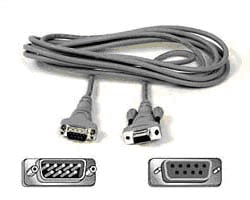
Another method of data transmission from the barcode reader to the computer is by RS-232 Serial ASCII format. If you have a multi-user computer, (for example a UNIX system), with serial ASCII terminals for each user, the barcode reader can attach between the terminal and host computer, transmitting ASCII data just like the terminal; in fact the barcode data looks just like keyed data. when attached like the following figure:
Bluetooth Scanners
A Bluetooth Barcode Scanner is very similar to a Wireless Barcode Scanner but uses Bluetooth technology to transmit its data. The Bluetooth interface has a shorter range than other wireless technologies but is found in many small devices such as cell phones and PDAs. This makes the Bluetooth Barcode Scanner flexible since it can interact with a much wider array of devices.
Portable Readers
A Wireless Barcode Scanner (also known as an RF Barcode Scanner or a Cordless Barcode Scanner) operate on wireless frequencies like a cordless phone. A Wireless Barcode Scanner transmits scanned data to a base station which is connected to the computer. The base station also doubles as a battery charger for the scanner. Wireless Barcode Scanner models vary by transmission range and by battery life, and are ideal for warehouses and retail stores.
Printing Barcodes
There are several methods of getting printed barcodes; these are:
- Buying photocomposed barcodes from a label manufacturer.
- Printing your barcodes with inexpensive labeling software on your personal computer's laser or inkjet printer.
- Printing barcodes on a specialized barcode label printer.
- For manufacturers who need barcodes printed in their product's packaging, use purchased film masters or use barcode fonts suitable for PostScript® film output.
Whatever printing source you decide upon, there are a few common sense tips to pass on:
- Stay away from colored barcodes (use black) and colored backgrounds (use white). Any other colors lower the contrast between bars and spaces and therefore lower readability.
- Do thorough readability testing on any labels before distribution. Be careful. Don't discover a problem after you have distributed 10,000 labels that need to be recalled.
Pre-printed Labels
If the only barcode application you are doing is an application such as fixed asset inventory tracking and employee badges, pre-printed serialized labels make a lot of sense. Libraries typically use pre-printed labels. Why? Because the labels need to last for 25 years and the volume is usually 100,000 per library. High quality, durable, laminated photocomposed labels are usually used.
More Questions? Email us at [email protected] or call 800-485-3730
- Industry Leader
- In business over 20 years
- Thousands of satisfied customers
- Unmatched Expertise
- Trained barcode experts
- Manufacturer certified
- Superior Service
- Same day shipping
- Easy returns

